Page: Brand guide
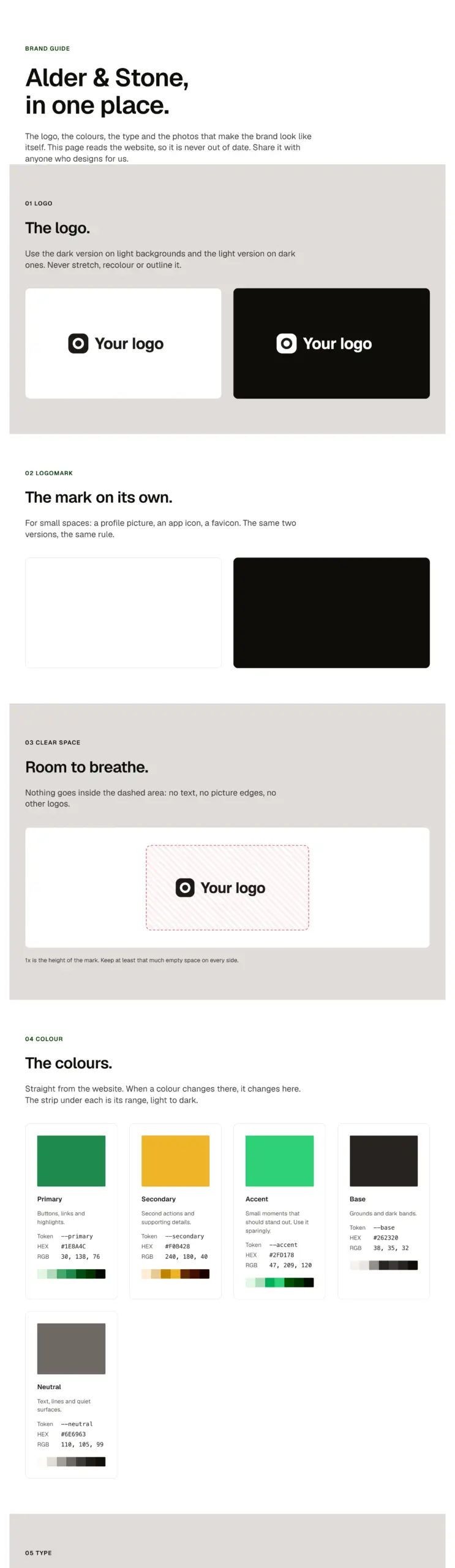
A brand guide for a client in one paste: the logo and the mark on light and dark, clear space, the colours with their HEX, RGB and shades, the typefaces and the type scale, all read live from the site, and the brand's photos. Share it with a magic link from the panel.
Live preview
Brand guide
Alder & Stone, in one place.
The logo, the colours, the type and the photos that make the brand look like itself. This page reads the website, so it is never out of date. Share it with anyone who designs for us.
01 Logo
The logo.
Use the dark version on light backgrounds and the light version on dark ones. Never stretch, recolour or outline it.


02 Logomark
The mark on its own.
For small spaces: a profile picture, an app icon, a favicon. The same two versions, the same rule.


03 Clear space
Room to breathe.
Nothing goes inside the dashed area: no text, no picture edges, no other logos.
1x is the height of the mark. Keep at least that much empty space on every side.
04 Colour
The colours.
Straight from the website. When a colour changes there, it changes here. The strip under each is its range, light to dark.
Primary
Buttons, links and highlights.
- Token
--primary- HEX
- RGB
Secondary
Second actions and supporting details.
- Token
--secondary- HEX
- RGB
Accent
Small moments that should stand out. Use it sparingly.
- Token
--accent- HEX
- RGB
Base
Grounds and dark bands.
- Token
--base- HEX
- RGB
Neutral
Text, lines and quiet surfaces.
- Token
--neutral- HEX
- RGB
05 Type
The typefaces.
One for headings, one for everything else, the same on the website and everywhere the brand appears.
Headings
Headlines and titles.
RegularBold
ABCDEFGHIJKLMNOPQRSTUVWXYZ abcdefghijklmnopqrstuvwxyz 0123456789 & ! ? @ ( ) , . : ;
Body
Paragraphs, buttons, captions and forms.
RegularBold
ABCDEFGHIJKLMNOPQRSTUVWXYZ abcdefghijklmnopqrstuvwxyz 0123456789 & ! ? @ ( ) , . : ;
06 Type scale
Every size of text.
Sizes grow and shrink with the screen; each row shows its size on the screen you are using.
- Heading 1The brand in one place
- Heading 2The brand in one place
- Heading 3The brand in one place
- Heading 4The brand in one place
- Large textThe brand in one place
- Body textThe brand in one place
- Small textThe brand in one place
07 Imagery
How the brand looks in photos.
Real work, real people, daylight. Swap these for the client’s own photos.

Questions
Using the brand somewhere new?
Ask before it goes to print, on a van or on a new website. We will send the files you need.
Props
A page: swap the two logos, the two marks and the photos for the client's (Media Library), name the colours, edit the words. The colours, fonts and sizes fill in from Automatic.css on their own.
States shown
Every state comes from the components inside; see their pages.
How to change it
It is a whole page built from library patterns and components (Section intro). Keep, reorder or remove sections in the structure panel, then edit each component's props. Colour, type, spacing and radius follow your Automatic.css settings, so a change to the site's palette or scale changes this too.
ACSS tokens used
Every token the included patterns use; see their pages.
ACSS requirements
ACSS 4 defaults. Every component the page uses comes with the paste. Header and footer come from your site's template, not from the page.
Version history
Version 1.0.0, October 14, 2026: First release: a client's logo, colours, type and photos on one page, read live from the site and shared with a magic link from the panel.
Tested with
Etch 1.7.0 and ACSS 4.0.1. Version 1.0.0.
Lifetime members
Members copy this straight into Etch, ready to paste.
Used an earlier version? How to update it
Get lifetime accessWant EtchPress for Bricks or the block editor?
Everything here is made for Etch. Pick the builder you use and leave your email: we write once, when EtchPress works there.